OfficeCalc
A 10-key desk calculator for people who need to see their working, not just the answer. Every figure lands on a running tape you can scroll back, correct, label and export.
Built for invoices, quotes, stock counts and cashing up
Change any figure, any time
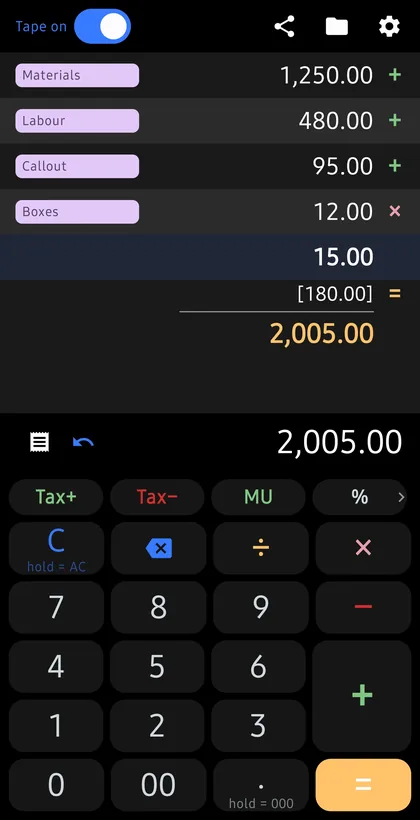
Tap a line to correct it or delete it, and everything below recalculates on its own. No retyping the column because one number was wrong. This is the part most tape calculators cannot do.
A real tape, not a history list
Every entry gets its own line with the operator beside it, like a printing calculator. Multiplication and division resolve first and show their result in brackets, so you can see where a figure came from.
Subtotal and grand total
Subtotal prints the running figure without ending the chain, so you can check yourself halfway down a column and carry on. Grand total sums every result since the last clear.
Tapes are sessions
Name a tape, close the app, come back tomorrow and carry on from its last figure. Label any row (Supplies, Invoice 214, Till 2) so it still makes sense a week later.
Tax, markup and percentages
Keep several tax rates and switch between them without going into settings. Tax+ adds it, Tax- takes it back out, and both write a row showing the rate, the amount and the result. Arithmetic runs on decimal maths, so money does not drift.
Offline and private
No account and no sign-in. Your tapes stay on your device, and the calculator never uses the network. Export as plain text or CSV, or take a full backup to a file you choose.
The calculator is free. A one-time Pro unlock, not a subscription, adds PDF export, extra colour palettes, AMOLED true black and custom keypad sizes. Nothing you need in order to do a calculation, or to get your own data out, sits behind it.